SMS
The SMS section of the user interface lets you configure predefined messages and the numbers enabled to send and receive SMS through the cellular modem. To use this section, you must first enable Use SMS in the Modem tab.
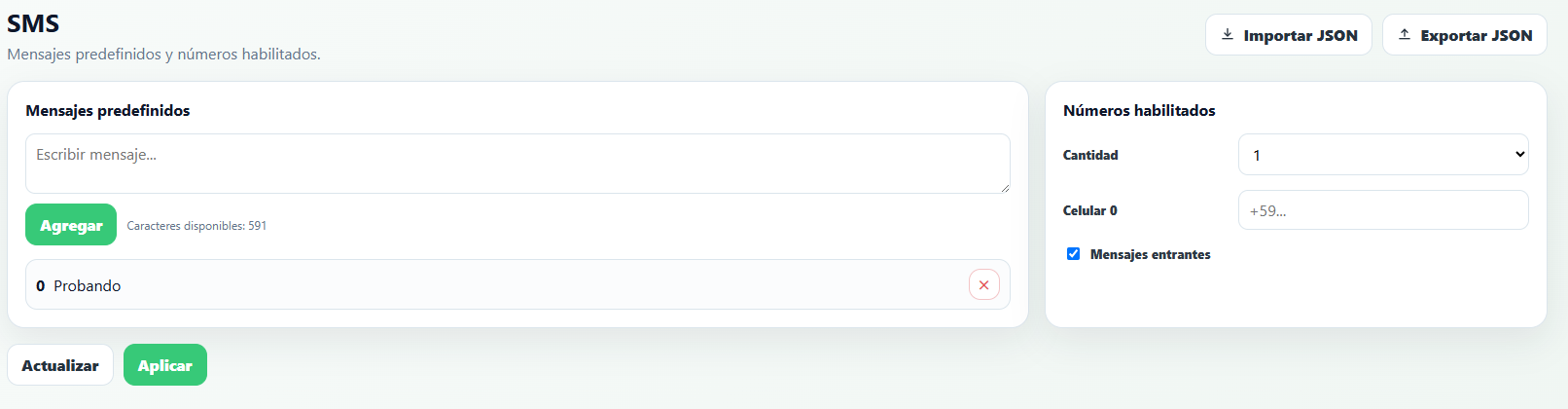
Predefined messages
Each predefined message is identified by its index (0, 1, 2…), in the order they're added. That index is what's used as message_index when sending an SMS from the script with the send_sms function (see the Script section).
- Write the text in the box and press Add. The available characters counter shows the total space left for all predefined messages combined, not per individual message.
- Each message in the list can be removed with the ✕ button.
Enabled numbers
- Count — how many phone numbers will be configured.
- Phone N — the phone number corresponding to index N (
phone_indexinsend_sms), in international format (for example+598...). - Incoming messages — if checked for a number, the RTU-X processes SMS it receives from that number (see the
sms_phonesystem variable in the Script section).