Log
The RTU-X has a log where variable records can be saved to flash memory. Each record stores the variable name, the value it had at the time it was logged, and the date/time it was logged.
The log's exact capacity is 202,624 records. When the log is full, each new record overwrites the oldest one.
The log can be viewed and cleared from the configuration software.
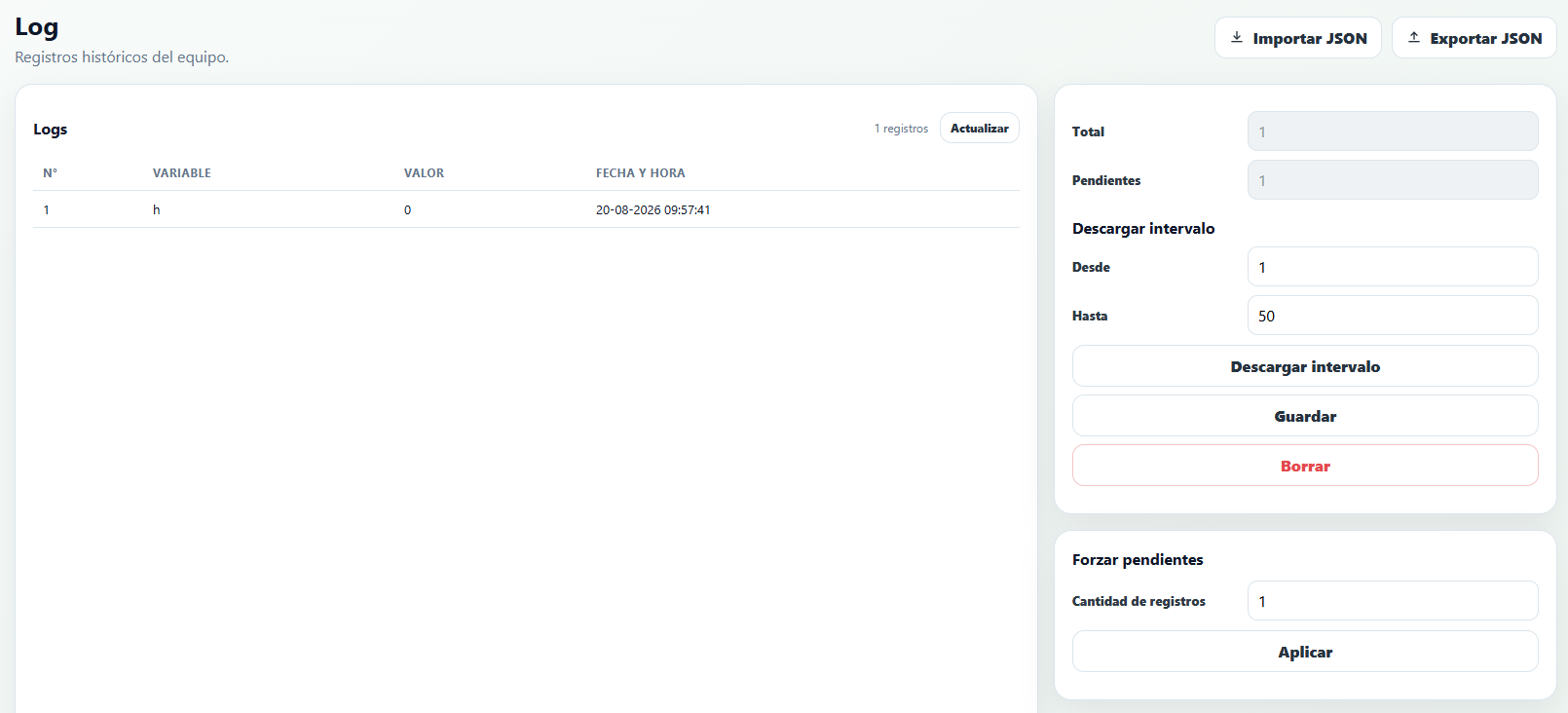
The available information and possible actions are as follows:
- Total
Shows the total number of records saved in the log. - Pending
Shows the number of records saved in the log that haven't been sent over MQTT yet (see the Communications section for more detail). - Download range (From / To)
Downloads the records between the specified indexes from the RTU-X to the configuration software. Depending on the number of records and the connection type, this may take several minutes. - Save
After downloading the log records, this option lets you save them to a.csvfile. - Clear
Permanently deletes the entire contents of the log. - Force pending (Number of records)
Marks the last N records as pending so their delivery over MQTT is retried, without waiting for a new event to occur.
A variable is saved to the log using the log function in the script. The variable must be defined with the telemetry or attribute prefix.
The RTU-X also has a block of RAM memory, independent from the log, intended for storing variables that are later sent over MQTT without needing to be permanently saved to the log. This memory has a capacity of 100 records, and the report function is used to save a variable to it. The variable must be defined with the telemetry or attribute prefix.
Records saved in this RAM memory block are lost if the RTU-X is powered off or goes into low power mode.
log or report?Use log when the data must survive a shutdown or connection loss (it stays in flash until it can be sent). Use report for frequent data where losing an occasional value isn't critical and isn't worth wearing down the flash memory.
The difference between log and report, and the difference between using them with telemetry and attribute type variables, is described in the table below:
| Function | Variable telemetry | Variable attribute |
| log | The variable is saved to the log records in flash and sent over the telemetry topic configured in the MQTT section, including a timestamp. If the RTU-X powers off before the record can be sent over MQTT, the record remains saved in memory and is sent the next time it powers on and connects. | The variable is saved to the log records in flash and sent over the attribute topic configured in the MQTT section, including a timestamp. If the RTU-X powers off before the record can be sent over MQTT, the record remains saved in memory and is sent the next time it powers on and connects. |
| report | The variable is saved to a RAM block and sent over the telemetry topic configured in the MQTT section, including a timestamp. If the RTU-X powers off before the record can be sent over MQTT, the record is lost. | The variable is saved to a RAM block and sent over the attribute topic configured in the MQTT section, without a timestamp. If the RTU-X powers off before the record can be sent over MQTT, the record is lost. |