Communications
The Communications section of the user interface groups all interfaces and protocols into six tabs: LAN, Serial and Modbus, Modem, Bluetooth / NTP, MQTT, and LoRa.
LAN
The LAN tab is used to configure the device's own access point and the connection to an existing WiFi or Ethernet network.
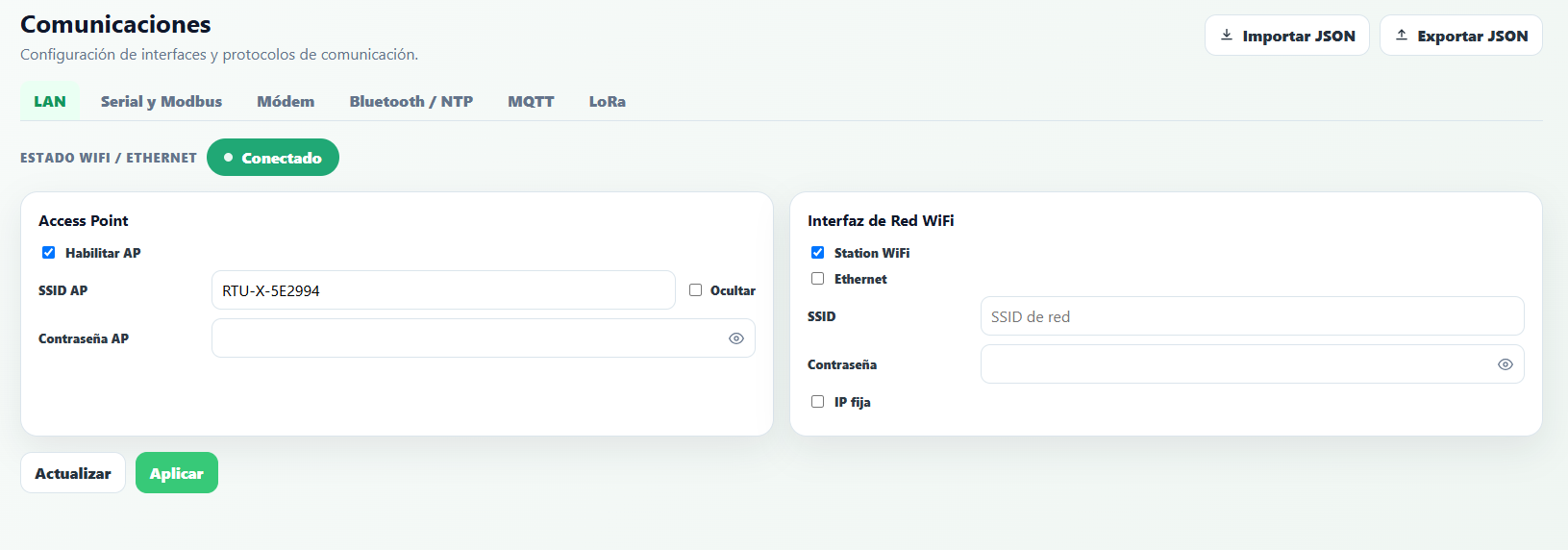
Access Point
- Enable AP — turns the device's own access point on or off.
- AP SSID / AP Password — name and password of the network created by the RTU-X. The factory password is
password; we recommend changing it before installing the device in the field. If the password is left empty, the access point is open with no security. - Hide — hides the SSID so it doesn't show up when scanning for networks, although it remains accessible if the SSID and password are known.
In this configuration, the RTU-X address is always 192.168.4.1 and DHCP is enabled: the device assigns an IP to each device that connects to the access point.
WiFi Network Interface
- Station WiFi / Ethernet — both interfaces can be enabled at the same time, in addition to the access point. The Ethernet option is only available on the DIN model.
- SSID / Password — credentials of the network the device connects to.
- Fixed IP — if unchecked, the device gets its IP via DHCP from the network it connects to; if checked, a static IP can be configured.
Serial and Modbus
The Serial and Modbus tab groups the configuration of the RS-485 serial interfaces (optional expansion modules) and the device's Modbus server.
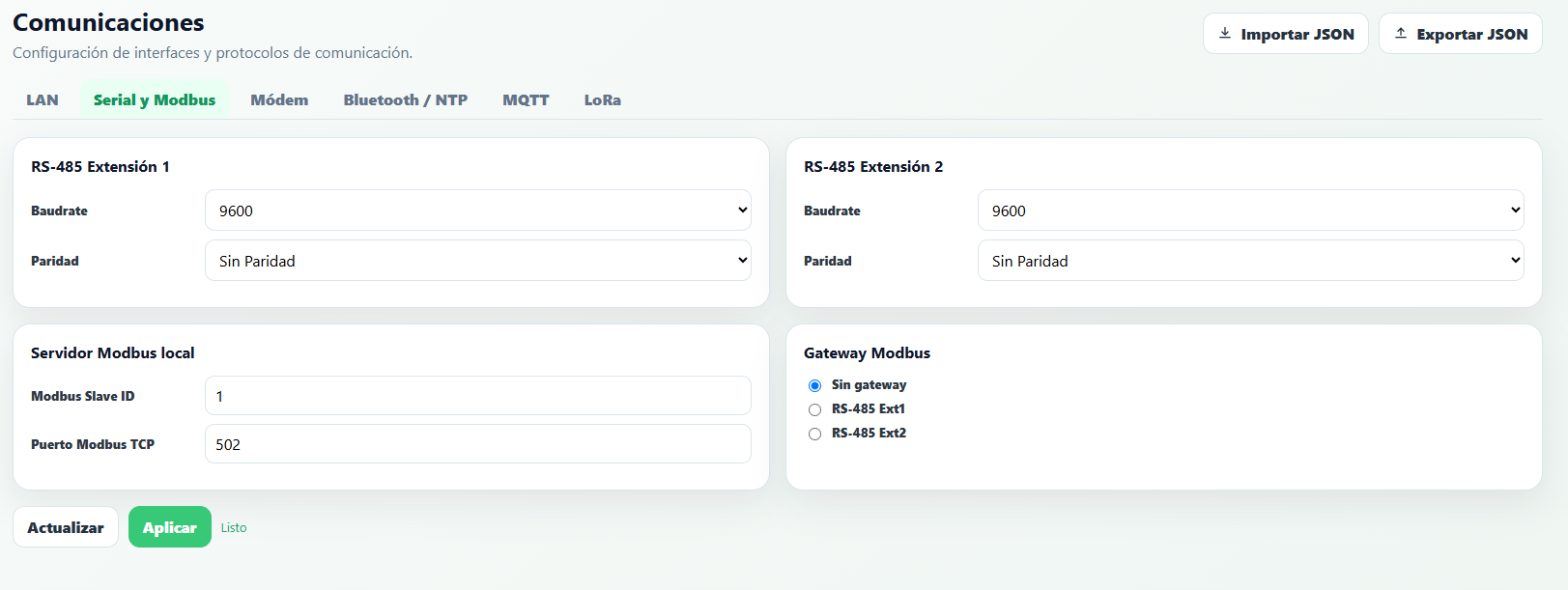
RS-485 Extension 1 / Extension 2
The Baudrate and Parity can be configured for each serial interface.
Local Modbus server
- Modbus Slave ID — the RTU-X's Modbus slave number (default 1).
- Modbus TCP port — the TCP port used for Modbus TCP connections (default 502).
Modbus Gateway
Defines the interface to which Modbus messages whose recipient does not match the RTU-X's Slave ID are forwarded: No gateway (responds with an error to those messages), RS-485 Ext1, or RS-485 Ext2. Through this functionality, the RTU-X can act as an intermediary so a client can communicate transparently with a device connected to the RS-485 bus in the expansion modules.
Modem
The Modem tab is used to configure the parameters of the cellular modem, an optional module.
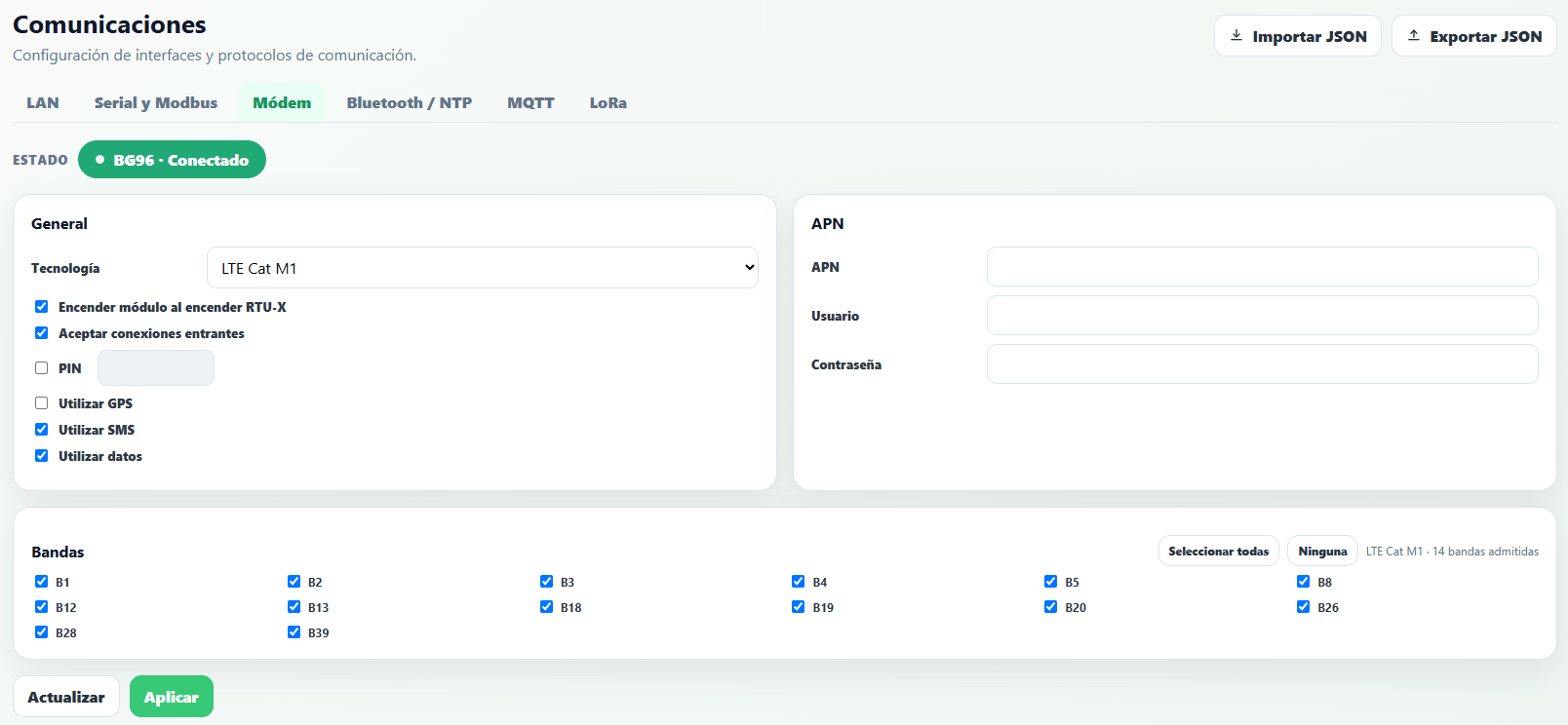
- Technology — depending on the module installed, different communication technologies and bands are supported.
- Quectel BG95: LTE Cat-NB1 or LTE Cat-M1 with downgrade to 2G.
- Cat M1 / NB-IoT - B1/B2/B3/B4/B5/B8/B12/B13/B18/B19/B20/B25/B26/B27/B28/B31/B66/B71/B72/B73/B85
- EGPRS 850/900/1800/1900 MHz
- Quectel EG91: LTE with downgrade to 3G / 2G.
- LTE - B1/B2/B3/B4/B5/B7/B8/B28/B66
- WCDMA - B1/B2/B5/B8
- EGPRS 850/900/1800/1900 MHz
- Quectel BG95: LTE Cat-NB1 or LTE Cat-M1 with downgrade to 2G.
- Power on module with RTU-X — normal operating mode when the RTU-X is always on and connected to a stable power source. If disabled, the modem can be turned on and off from the script with the
modem_onvariable; this is typically used in critical-consumption applications, to power the modem on for short periods and send only the information stored in the log. - Accept incoming connections — allows the RTU-X to accept incoming connections on port 502 used by the user interface. Disabled by default.
- PIN — the SIM PIN, if required.
- Use GPS — enables GPS; the information is made available in script variables.
- Use SMS — enables sending and receiving SMS (see the SMS section).
- Use data — enables the data connection with the configured APN (APN, username, and password).
- Bands — bands enabled for the selected technology; the Select all / None buttons speed up configuration.
Bluetooth / NTP
The Bluetooth / NTP tab groups the configuration of BLE connectivity and time synchronization.
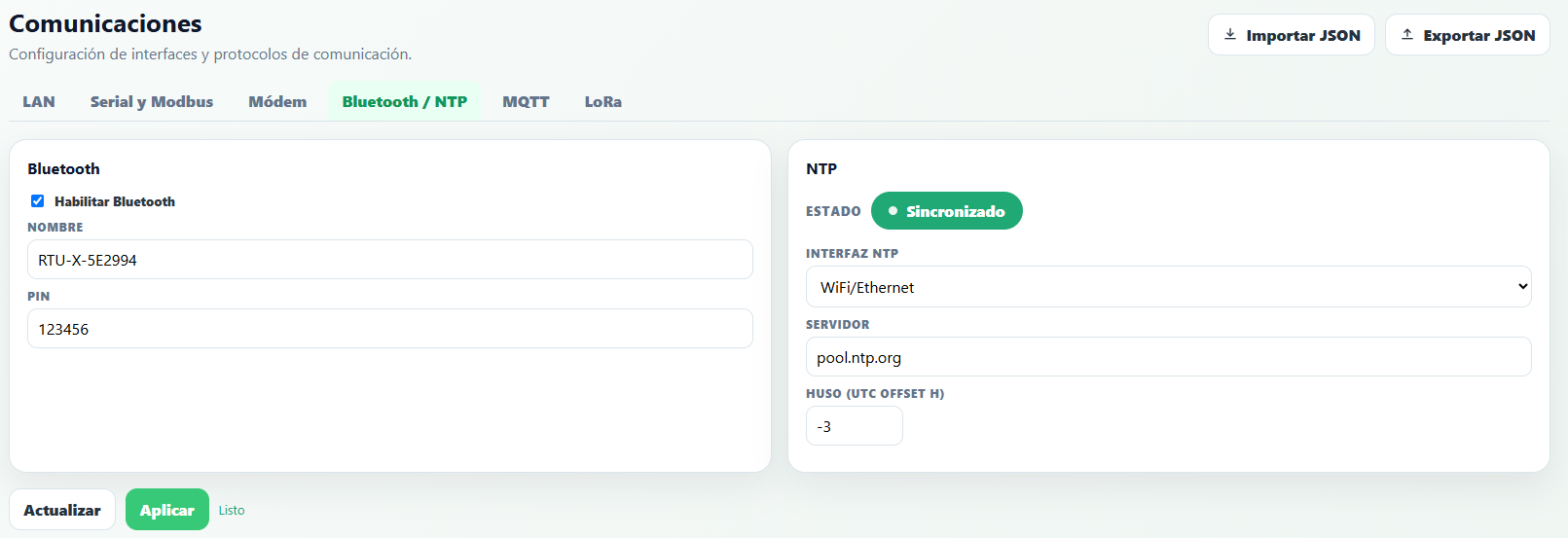
Bluetooth
The RTU-X ships with built-in BLE 4.2 connectivity, which can be used to connect to the device from the user interface, and also to act as a master to other BLE devices, such as temperature and humidity sensors.
- Enable Bluetooth — turns the interface on.
- Name — name the device advertises itself with (default
RTU-X-YYYYYY). - PIN — code requested when pairing. The factory PIN is
123456; we recommend changing it before installing the device in the field.
NTP
- Interface — WiFi/Ethernet, modem, or the same interface used for the MQTT connection.
- Server — URL or IP address of the NTP server.
- Timezone — timezone relative to UTC.
MQTT
MQTT is a communications protocol over TCP/IP that has been adopted as one of the most widely used standards for IoT devices.
The RTU-X uses MQTT to send log records to a cloud server, but it's also used to perform other, more complex functions when the RTU-X is connected to Thingsboard: updating the entire configuration, synchronizing shared variables, or sending RPC commands.
MQTT Configuration
The parameters to configure for the MQTT connection are as follows:
- Interface — The RTU-X implements the MQTT protocol over WiFi/Ethernet and the modem's data connection. The physical interface to use must be selected.
- Format — The following options are available, and the screen changes depending on which one is selected:
- JSON - Uses the JSON format to send log records.
- Ultralight - Uses the Ultralight 2.0 format to send log records.
- Predix - Uses the JSON format compatible with General Electric's MQTT Data Collector, as described here.
- Thingsboard - With this option, the RTU-X is configured to establish a connection with a Thingsboard server. Nettra's Telemetry+ is a professional Thingsboard instance managed by Nettra.
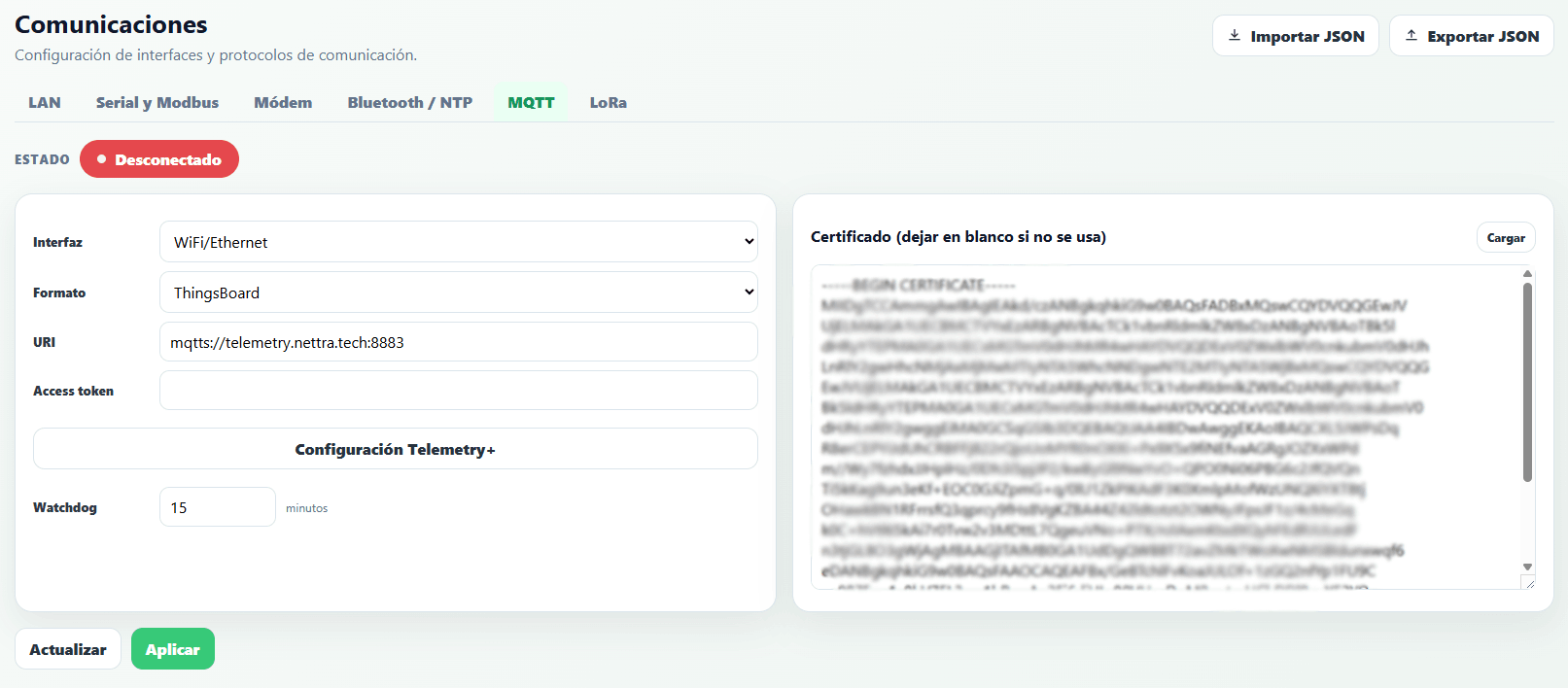
Thingsboard format
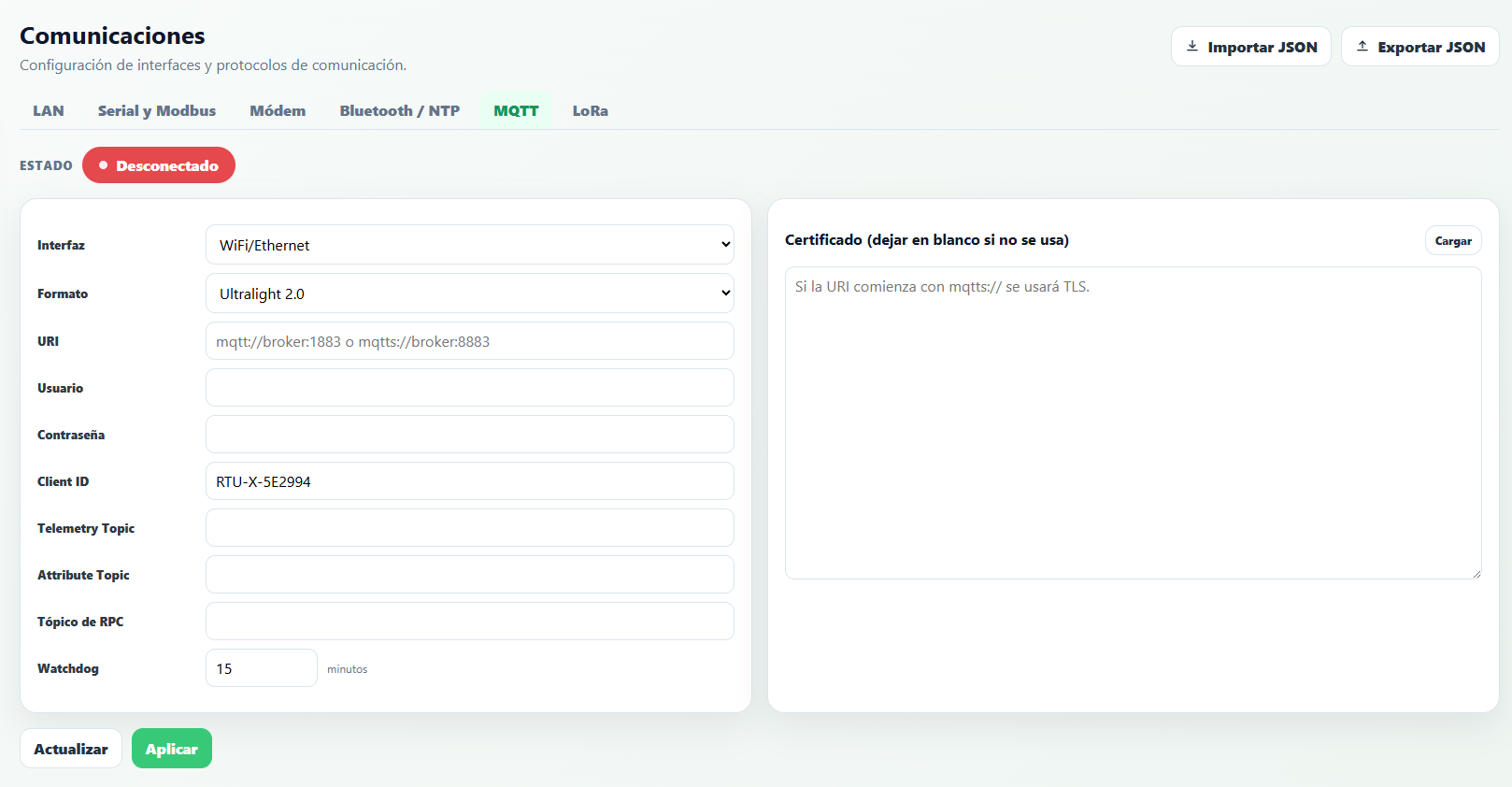
JSON, Ultralight, or Predix format
- URI — Defines the connection type, server, and port. The URI must follow the format "scheme://host:port", where the scheme can be
mqttormqttsdepending on whether an SSL connection is desired. An example URI ismqtts://myhost.com:8883. - Access token / Username, password, and Client ID — With the Thingsboard format (first image), the field is simplified to a single Access token: the same value is used as both username and Client ID, and the password is left empty (as required by ThingsBoard). In the other formats (second image), the three fields Username, Password, and Client ID are filled in separately, according to the MQTT protocol.
- Topics (telemetry, attributes, RPC) — With the Thingsboard format the topics are fixed and hidden; the Telemetry+ Configuration button automatically fills in the URI and certificate with Nettra's instance defaults. In the other formats, the Telemetry Topic, Attribute Topic, and RPC Topic fields remain visible and are defined by the user.
- Watchdog — In minutes. Implements a safety mechanism in case of a communication failure: if the MQTT connection can't be established within the configured time, the RTU-X restarts automatically. With the value at zero, this functionality is disabled.
- Certificate — The server's certificate in PEM format, if SSL is used for the MQTT connection. Leave blank if not used.
When using Nettra's Telemetry+ instance, select the Thingsboard format and press Telemetry+ Configuration to automatically fill in the URI and certificate; only the Access token provided by Nettra is left to fill in.
When MQTT is enabled, data recorded via the log and report statements is transmitted using this transport protocol. This is not compatible with enabling the LoraWan protocol.
Both functions can be used with variables of type telemetry or attribute.
Thingsboard Integration
When Thingsboard is selected as the format for the MQTT connection, the RTU-X implements additional functionality besides sending the log over MQTT.
These functionalities are described below.
Shared attributes
When a script variable is defined with the shared prefix, the variable's value is synchronized with the value of the shared attribute with the same name in Thingsboard, if it exists.
This happens automatically, with no special action required from the user, because when the MQTT connection is established, the RTU-X automatically subscribes to the topics.
Periodic reporting of internal attributes
The RTU-X automatically publishes a list of useful internal variables to the server. These are registered in the system as client attributes.
The following variables are published every time the connection to the server is established:
| Variable | Detail |
| model | RTU-X model (DIN or IP68) and hardware version |
| mac_wifi | MAC address of the WiFi module. |
| ext1 | Information about the module connected in expansion socket 1. |
| ext2 | Information about the module connected in expansion socket 2. |
| modem_imei | Modem IMEI (if a modem is present in the communication socket). |
| modem_imsi | SIM IMSI (if a modem is present in the communication socket). |
The following variables are sent periodically every 10 minutes:
| Variable | Detail |
| battery | Battery percentage. |
| battery_status | Battery operating status. Can be Charged, Charging, or No power. |
| internal_temperature | RTU-X internal temperature |
| modem_signal | Modem signal level in dBm. |
| wifi_signal | WiFi signal level in dBm. |
Telemetry publishing
The following table describes the JSON format used to publish telemetry via MQTT for each possible format.
| Format | Variable telemetry |
| JSON and Thingsboard | where XXX is the UTC timestamp in unix format in milliseconds of the records |
| Ultralight 2.0 | ts|TTT|variable1|value|variable2|value
where TTT is the UTC timestamp in ISO8601 format |
| Predix |
|
All log records created with the same date/time are sent in a single MQTT packet.
If the connection is lost, all records remain stored in the log and are sent once the connection is re-established.
Attribute publishing
| Format | Variable attribute |
| JSON and Thingsboard |
|
| Ultralight 2.0 | variable1|value1|variable2|value2
|
| Predix |
|
RPC Commands
RPC stands for "Remote Procedure Call" and is used to send commands and queries from a server. The format used to send commands and their responses depends on the format in use. The available commands are detailed below.
Thingsboard format
| Function | Description | Command | Response |
| set | Modifies a variable of type telemetry, attribute, or shared, where NAME is the variable's name and VALUE is the value |
| OK
|
| get | Queries a telemetry, attribute, or shared variable, where NAME is the variable's name |
| VALUE
|
| resend_log | Requests resending of the last N records stored in the event log |
| OK
|
| unixtime | Sets the RTU-X's time in GMT-0. T is the current instant in unix format |
|
|
| localtime | Sets the RTU-X's local time from year, month, day, hours, minutes, and seconds of the current instant |
|
|
| timezone | Sets the RTU-X's timezone, where N is the new timezone |
| OK
|
| reset | Performs a reset of the RTU-X |
| No response |
| calendarEvents | Defines calendar events that give value to the calendar variables declared in the script. When |
| No response |
The RPC command calendarEvents is not the only way to define calendar events. There are two:
- Cloud events — loaded from the Telemetry+ platform, which sends this same RPC command to the RTU-X behind the scenes.
- Local events — loaded directly from the Events section of the user interface, without depending on Telemetry+ or an internet connection.
Cloud and Local modes are mutually exclusive: only one of the two event sources is active at a time.
JSON format
| Function | Description | Command | Response |
| set | Modifies a variable of type telemetry, attribute, or shared, where NAME is the variable's name and VALUE is the value |
|
|
| get | Queries a telemetry, attribute, or shared variable, where NAME is the variable's name |
|
|
| resend_log | Requests resending of the last N records stored in the event log |
|
|
| unixtime | Sets the RTU-X's time in GMT-0. T is the current instant in unix format |
|
|
| localtime | Sets the RTU-X's local time from year, month, day, hours, minutes, and seconds of the current instant |
|
|
| timezone | Sets the RTU-X's timezone, where N is the new timezone |
|
|
| reset | Performs a reset of the RTU-X |
| No response |
Ultralight format
| Function | Description | Command | Response |
| set | Modifies a variable of type telemetry, attribute, or shared, where NAME is the variable's name and VALUE is the value | setNAME|VALUE
|
|
| get | Queries a telemetry, attribute, or shared variable, where NAME is the variable's name | getNAME
|
|
| resend_log | Requests resending of the last N records stored in the event log | resend_log|N
|
|
| unixtime | Sets the RTU-X's time in GMT-0. T is the current instant in unix format | unixtime|T
|
|
| localtime | Sets the RTU-X's local time from year, month, day, hours, minutes, and seconds of the current instant | localtime|Y/m/d,H:M:S
|
|
| timezone | Sets the RTU-X's timezone, where N is the new timezone | timezone|N
|
|
| reset | Performs a reset of the RTU-X | reset
| No response |
LoraWan
The RTU-X can connect to a LoraWan network from the LoRa tab. To do so, a RAK3172 module is installed in the WAN socket, to which an external antenna can be connected.
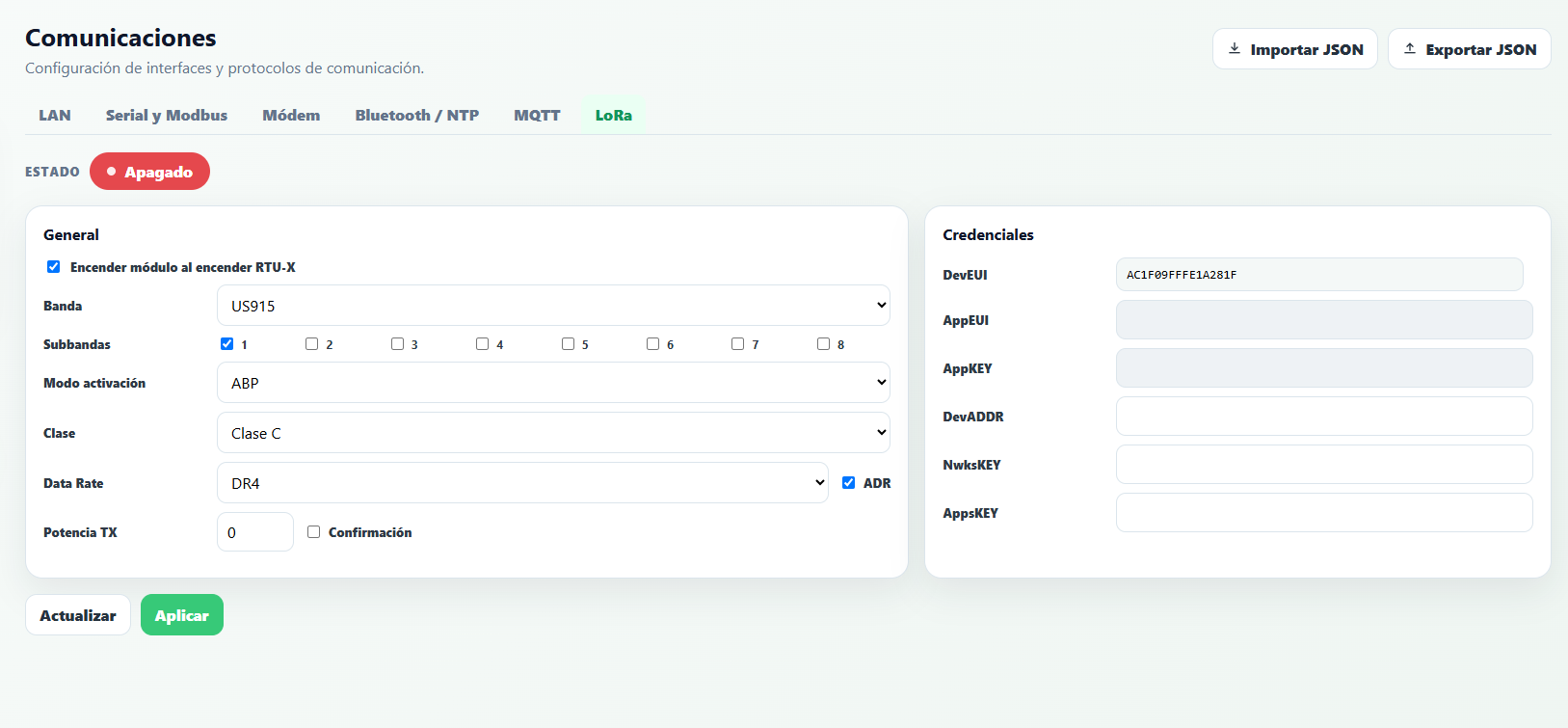
General
- Power on module with RTU-X — normal operating mode when the RTU-X is always on and connected to a stable power source. If disabled, the module can be turned on and off from the script with the
modem_onvariable. - Band — a choice between US915 and AU915.
- Sub-bands — enable channels in groups of eight: sub-band 1 enables channels 0 to 7, sub-band 2 enables channels 8 to 15, and so on.
- Activation mode — a choice between OTAA and ABP.
- Class — depending on the power-consumption constraints of the solution, a choice between class A and C.
- Data Rate — the data rate to use, according to the selected band.
- ADR (Adaptive Data Rate) — enables or disables this functionality.
- TX Power — transmission power index according to the LoRaWAN standard: 0 is the maximum power allowed by the band, and each higher value reduces it by one step.
- Confirmation — enables or disables sending messages with a confirmation request.
Credentials
The keys and addresses needed to establish a connection with a LoraWan network must be defined by the user: AppEUI and AppKEY in OTAA mode, or DevADDR, NwksKEY, and AppsKEY in ABP mode (fields that don't apply to the chosen activation mode are disabled). The device's DevEUI is the one defined by the module manufacturer and is shown read-only once the module is enabled.
Sending and receiving data
As with MQTT, when LoraWan is used there are mechanisms for exchanging data with an IoT platform.
To differentiate between types of data and commands, several ports are used, as shown in the following table
| Port | Description |
| 100 | Used to publish data stored in the event log when the log and report functions are executed in the script |
| 101 | Used to publish client attributes, i.e. the variables declared as attribute in the script. |
| 102 | Used to receive shared attribute values. |
| 103 | Used to request an update of shared attributes |
| 104 | Used for the implementation of RPC commands and their corresponding responses |
Data encoding
Since the names of the variables being transmitted are defined by the user in the RTU-X script (telemetry-type variables), it's necessary to include the reported variables' names in addition to their values. So, in order to send and receive data while minimizing overhead, a variant of the Ultralight format is used.
In all data packets containing more than one element, those elements are separated by the "|" character. For example, attributes are reported as name|value.
Telemetry publishing
When the log or report statement is executed in the script using telemetry-type variables, the values are stored in the RTU-X's event log. If the connection to a gateway is established, the data is transmitted immediately using a payload with the format
ts|key1|value1|key2|value2|...|keyN|valueN
Where ts is the unix-format timestamp corresponding to the instant when the log statement was executed.
keyn and valuen are the name and value of each of the reported variables
Attribute publishing
If the log statement is used with attribute-type variables, the same format is used but without a timestamp
key1|value1|key2|value2|...|keyN|valueN
RPC Commands
RPC commands can be executed via LoraWan. The following table shows the implemented commands
| Function | Description | Command | Response |
| set | Modifies a variable of type telemetry, attribute, or shared, where NAME is the variable's name and VALUE is the value | setNAME|VALUE
|
|
| get | Queries a telemetry, attribute, or shared variable, where NAME is the variable's name | getNAME
| NAME|VALUE
|
| resend_log | Requests resending of the last N records stored in the event log | resend_log|N
|
|
| unixtime | Sets the RTU-X's time in GMT-0. T is the current instant in unix format (*) | unixtime|T
|
|
| localtime | Sets the RTU-X's local time from year, month, day, hours, minutes, and seconds of the current instant (*) | localtime|Y/m/d,H:M:S
|
|
| timezone | Sets the RTU-X's timezone, where N is the new timezone | timezone|N
|
|
| reset | Performs a reset of the RTU-X (*) | reset
| No response |
(*) only makes sense to use if class C operation is configured.
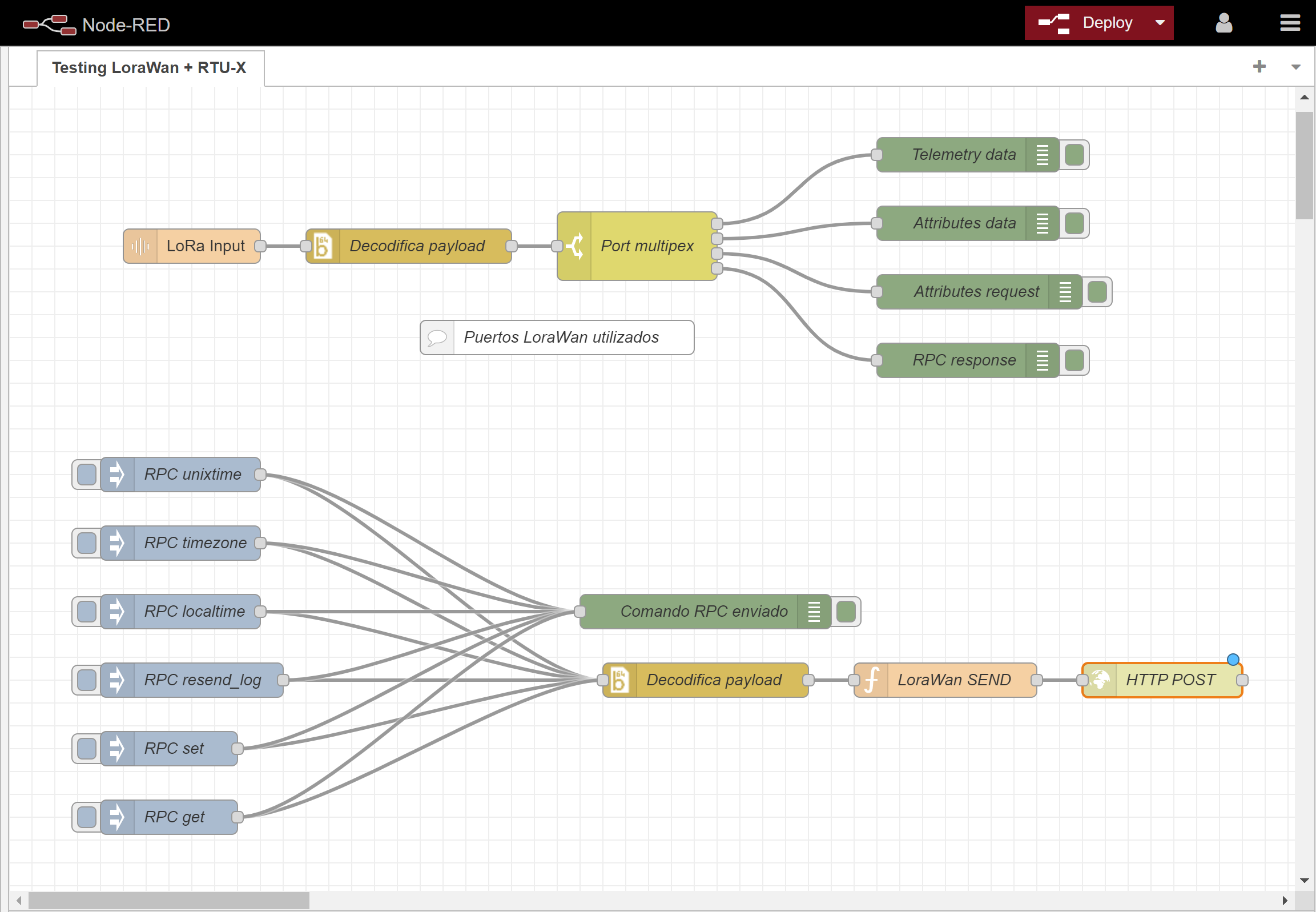
Testing with Milesight gateway and Node-Red
A Node-Red flow used to test sending and receiving data is available below.
It uses an HTTP node to execute a POST method that queues data for sending to the device connected via LoraWan.
For the flow to work correctly, the RTU-X's DEVEUI must be configured. The RTU-X must be configured on the gateway so incoming data reaches the flow. The gateway's IP address and the correct credentials to obtain the JWT needed for the HTTP POST to work must also be configured.