Script
The RTU-X can run a program that adds local intelligence to the device. This script, written in the user interface in an intuitive language with many similarities to the C programming language, can perform all kinds of operations with inputs and outputs, slaves, the log, etc.
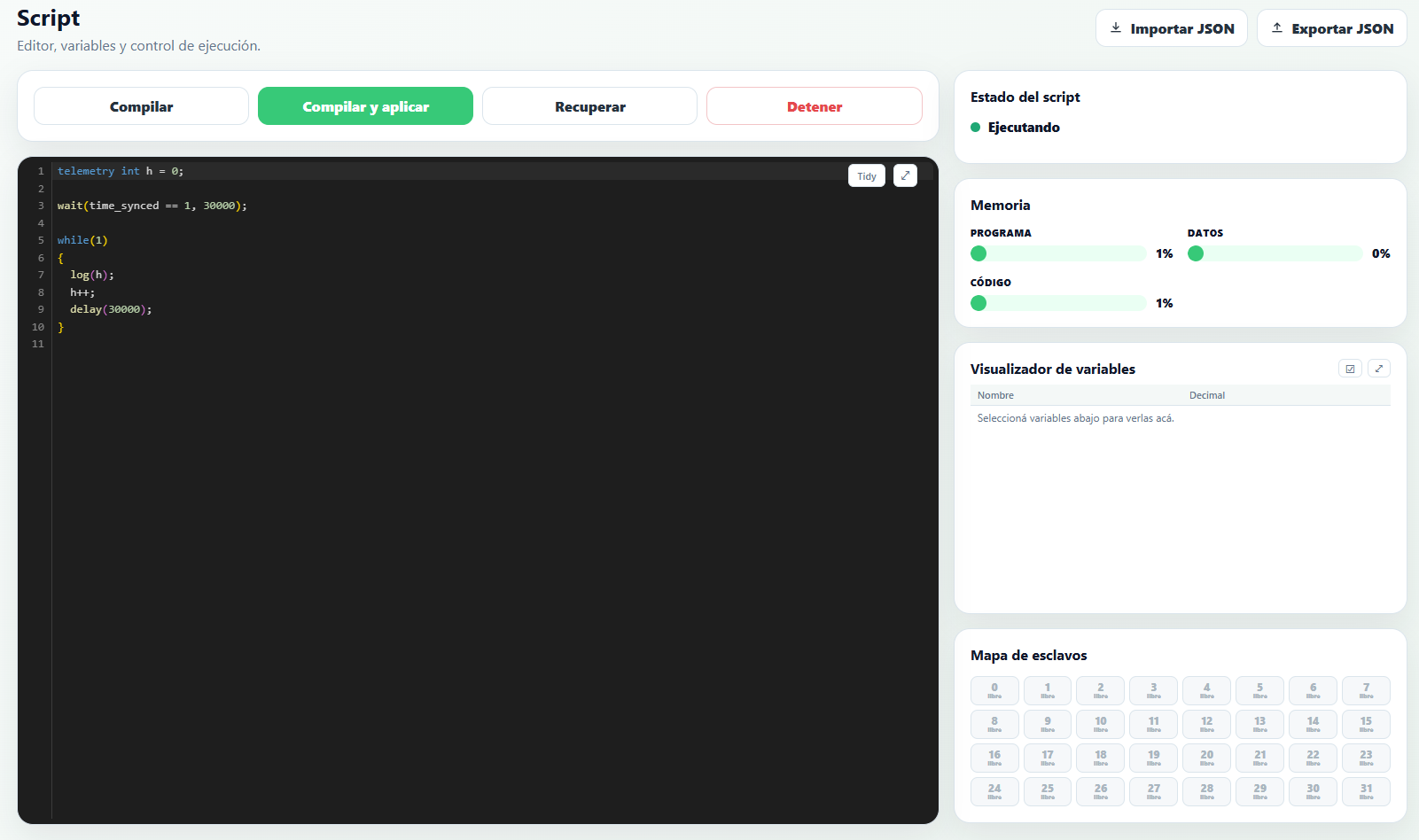
The language's characteristics and its use in the user interface are described below.
There's a Claude skill that knows this language in depth and can write, review, or debug scripts in a conversation — see AI Assistant (Claude).
The script editor
Besides the editor, the Script section of the user interface has several tools for compiling and debugging the program in real time:
- Compile / Compile and apply / Recover / Stop — control compiling and running the script on the connected device.
- Script status — shows whether the script is Running or Stopped.
- Memory — percentage of program, data, and code memory in use, to keep track of the available margin before hitting the device's limits.
- Slave map — a grid with the status of each configured Modbus/BLE slave.
- Variable viewer — shows the real-time value of the variables chosen with the selection button.
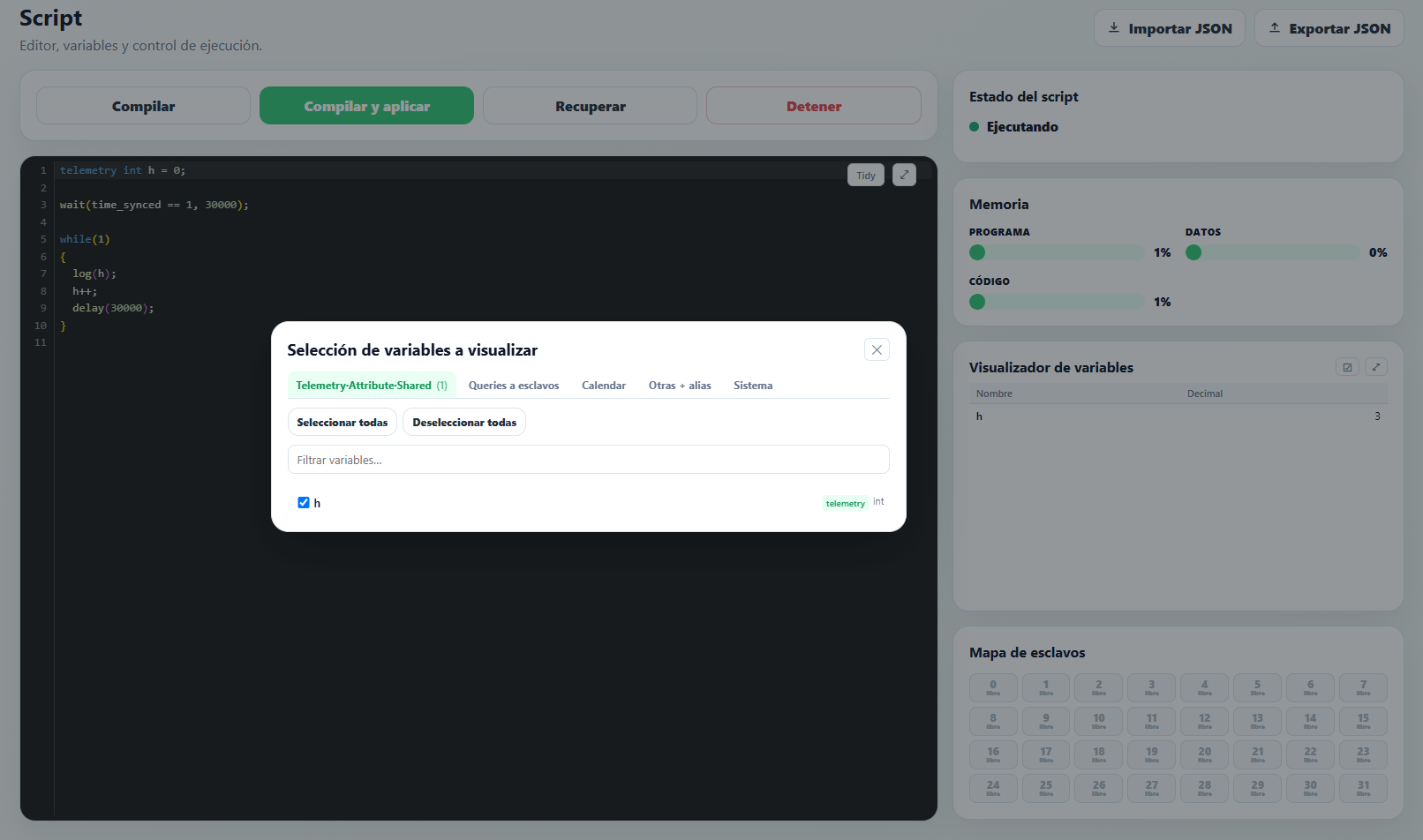
The variable selection modal organizes the available variables into tabs — Telemetry·Attribute·Shared, Slave queries, Calendar, Other + alias, and System — with a search box and Select all / Deselect all buttons to quickly build the set of variables to monitor while the script runs.
Language structure
The script must start with the declaration of all the variables to be used. Declaring variables partway through the program isn't allowed.
After the variable declarations, the program code must be written. This code runs only once, so if you want it to run continuously it must be placed inside an infinite loop.
Control Flow
If statement
The syntax is as follows:
if (Condition1)
{
    Instructions1
}
else if (Condition2)
{
    Instructions2
}
else
{
    Instructions3
}
If Condition1 is true, the Instructions1 block is executed; otherwise, if Condition2 is true, the Instructions2 block is executed; otherwise, the Instructions3 block is executed.
The else if and else blocks are optional.
While statement
The syntax is as follows:
while (Condition)
{
    Instructions
}
The instructions inside the while block run continuously as long as Condition is true. The instruction block can be empty.
For statement
The syntax is as follows:
for (Exp1; Exp2; Exp3)
{
    Instructions
}
Exp1 is an expression that runs only once, at the start of the loop. Exp1 usually contains an expression that initializes a counter used in the for loop.
Exp2 is the expression that indicates when the loop should end, and is therefore a conditional expression. This expression is evaluated at the start of each cycle of the loop, and the loop stops running when this expression is no longer true. As a result, the loop might not run at all.
Exp3 is an expression that runs at the end of each iteration, and is generally used to update the counter used in the loop.
On each iteration, all the statements inside the for block are executed.
Variables
There are two types of variables: general purpose variables and system variables.
General purpose variables
General purpose variables are those defined by the user in the script, and can be one of the following types:
| Type | Description |
int | 16-bit signed integer. Ranges from -32,768 to 32,767 |
uint | 16-bit unsigned integer. Ranges from 0 to 65,535 |
long | 32-bit signed integer. Ranges from -2,147,483,647 to 2,147,483,647 |
ulong | 32-bit unsigned integer. Ranges from 0 to 4,294,967,295 |
float | 32-bit floating point number. Single-precision IEEE 754 representation |
General purpose variables can be defined as arrays.
Some examples of variable definitions:
int i;                // Variable of type int called i
float f;                // Variable of type float called f
Telemetry, attribute, and shared variables
Any general purpose variable can be defined with the telemetry, attribute, or shared prefix.
Variables must be defined as telemetry or attribute to be used with the log and report functions.
The shared prefix is used exclusively when the RTU-X is integrated via MQTT with Nettra's Telemetry+ system, for variables that hold configuration parameters that are adjusted from the system.
Some examples of variable definitions:
attribute float f;    // Variable of type attribute float called f
telemetry int t;    // Variable of type telemetry int called t
Arrays
You can declare one- or two-dimensional arrays of any available data type. For example:
int a[10];            // Array of length 10
float b[12,3];          // Array of size 12 x 3
To avoid out-of-range evaluations, when a non-numeric expression is used as an index, it is evaluated modulo the corresponding maximum range. For example, for the arrays above:
c = a[3+i]; // the array is evaluated at position (3+i)%10
The maximum number of elements in a 1D array is 100. The maximum number of rows or columns in a two-dimensional array is 10.
An array can be declared as telemetry or attribute so its elements can be used as arguments to the log, report, logonchange, or report_on_change functions.
For one-dimensional arrays, the name stored in the event log will be the array name concatenated with the argument's offset expressed in decimal. For two-dimensional arrays, the array name is concatenated with the row number and column number expressed in hexadecimal.
Examples:
telemetry int a[10];
telemetry float b[12,3];

log(a[4]); // stored in the event log with the name a4
log(b[10,2]); // stored in the event log with the name bA2
Calendar variables
Variables defined with the calendar prefix are associated with calendar events, defined either locally from the Events section of the user interface, or remotely via RPC commands when the RTU-X is integrated with Nettra's Telemetry+ system. Suppose we define the integer variables a and b as
calendar int a = 0;
calendar int b = 0;
When the system variable unix_ts_utc falls within the interval defined for an event, the event is said to be active, and the variables take the values defined in the event. Otherwise, the variables take the default value set at initialization. If two events overlap, the one that starts first takes effect.
Static variables
Any general purpose variable can be defined with the static prefix.
When defined this way, the variable is stored in the RTU-X's non-volatile memory, so its value persists even if power and battery are lost.
To give a static variable an initial value, it must be initialized when declared. That way, the initial value is only loaded on the first run of the script, but not on subsequent runs.
For example:
static int a = 10;
static int b[3] = {1,2,3};
System reserved variables
There's a set of predefined variables related to the operation of the RTU-X and its peripherals that can be used from the script.
The following variables are available:
| Variable | Description | Type |
| INPUTS | ||
ain | Analog inputs. Represents the voltage in mV (0 – 10,000) for voltage inputs, or the current in uA (0 – 20,000) for current inputs. | int[8] |
pulses | Pulse count of the digital inputs | ulong[2] |
| MODBUS | ||
slave_error | Reflects the connection status between the RTU-X and the slaves. One bit is used per slave, where 1 indicates an error. For example, bit 2 of the variable represents the connection status with slave 2. | int |
| TIME | ||
hours | Current hour (0 – 24) | uint |
minutes | Current minutes (0 – 59) | uint |
seconds | Current seconds (0 – 59) | uint |
day | Day of the month (0 - 31) | uint |
month | Current month (1 – 12) | uint |
year | Current year | uint |
week_day | Day of the week (0 = Sunday) | uint |
time_synced | Indicates whether the time is synchronized. The variable can be 0 or 1. | int |
unix_ts_utc | Number of seconds in Unix format of the device's UTC time | ulong |
unix_ts_local | Number of seconds in Unix format of the device's local time | ulong |
calendar_events_count | Number of events defined in the system. The maximum is 50 | uint |
timer_et | Elapsed time (in milliseconds) of each timer() instance, useful for telemetry or debugging. The array index corresponds to the order in which each timer() call appears in the script. | ulong[16] |
| SMS | ||
sms_message | Index of the received message. If there are no received messages, the variable is -1. After receiving and processing a message, the user must set this variable back to -1. | int |
sms_parameter | Parameter of the received message | float |
sms_phone | Index of the phone that sent the received message | int |
| MODEM | ||
modem_on | If the WAN module isn't configured to turn on automatically when the RTU-X powers on, setting this variable to 1 or 0 lets you turn the modem on or off from the script. | int |
modem_status | Reflects the modem's operating status. The possible values are:
| int |
modem_signal | Modem signal level in dBm | int |
| LORA | ||
lora_on | If the WAN module isn't configured to turn on automatically when the RTU-X powers on, setting this variable to 1 or 0 lets you turn the LoraWan module on or off from the script. | int |
lora_status | Reflects the LoraWan module's operating status. The possible values are:
| int |
lora_snr | Signal-to-noise ratio in dB measured by the LoraWan module on the last transmission | int |
lora_rssi | Signal strength in dBm measured by the LoraWan module on the last transmission | int |
| WIFI | ||
wifi_status | Reflects the WiFi's operating status. The possible values are:
| int |
wifi_signal | WiFi signal level in dBm | int |
| MQTT | ||
mqtt_status | Reflects the MQTT connection status. The possible values are:
| int |
mqtt_pending_log | Number of records pending to be sent over MQTT. | ulong |
| GPS | ||
latitude | GPS latitude | float |
longitude | GPS longitude | float |
altitude | GPS altitude | float |
speed | GPS speed | float |
| BATTERY | ||
battery_percentage | Battery percentage | uint |
battery_protection | The RTU-X's internal battery has overheat protection that cuts off the charging process when the temperature exceeds approximately 40°C. While this protection is necessary, when ambient temperature is high it causes the undesired effect of cutting off charging. With value 1 (default) the protection is enabled, while with value 0 the protection is disabled. | int |
battery_status | Reflects the battery's operating status. The possible values are:
| int |
Bit access
You can access any individual bit of any variable by placing a dot and the bit number after the variable's name.
Example that saves bit 2 of variable x into bit 3 of variable y:
y.3 = x.2;
Alias
You can use an alias to refer to both general purpose variables and system variables. You can define an alias for any variable, an array element, or even a bit of a variable.
The following examples show the definition of different aliases:
alias error as slave_error.2;     // Alias for slave 3's error
alias analogica2 as ain[1];     // Alias for analog input 2
Constants
If constants are going to be used in the script, they can also be defined at the beginning of it. For example, to define a constant called THRESHOLD with a value of 30, you would do the following:
const THRESHOLD = 30;
The compiler will replace the word THRESHOLD with the value 30 wherever it appears in the script.
As with variables, there's a set of predefined constants related to the operation of the RTU-X and its peripherals that can be used from the script when relevant.
Operations
| Operation | Description |
| + | Addition |
| - | Subtraction |
| * | Multiplication |
| / | Division |
| % | Integer division remainder |
| & | AND (bitwise) |
| | | OR (bitwise) |
| ^ | XOR (bitwise) |
| ~ | NOT (bitwise) |
| && | Logical AND |
| || | Logical OR |
| ! | Logical NOT |
| == | Equal |
| ! = | Not equal |
| > | Greater than |
| > = | Greater than or equal |
| < | Less than |
| < = | Less than or equal |
++ | pre or post increment |
-- | pre or post decrement |
Slave devices and queries
The RTU-X can act as master to up to 32 devices (starting with firmware version 3.3.02). Currently, these slaves can be Modbus over RS-485 or BLE (Bluetooth).
Queries can be defined for each slave. The types of query depend on the slave type.
Slave and query configuration must be done at the beginning of the script, before the variable declarations and code.
To define a slave, use the slave reserved word, indicating the configuration parameters, and then within that slave's block define queries using the query reserved word.
The general form for defining a slave and its queries is shown below:
slave(interface, …)
{
    var_type var1 = query(query_type, …);
    var_type var2 = query(query_type, …);
}
The parameters of the slave and query functions depend on the interface and query_type, detailed below for each case.
Modbus slaves
The slave is defined as follows:
slave(modbus_rs485_ext1, slave_id, polling_period, format)
slave(modbus_rs485_ext2, slave_id, polling_period, format)
where:
slave_id: the slave's Modbus slave id numberpolling_period: the time interval between two consecutive queries, in secondsformat: can belittle_endianorbig_endian. Defines how bytes are ordered for variables longer than one byte.little_endianis the most common.
Queries are defined as follows:
var_type var1 = query(coils, address, r/w);
var_type var2 = query(inputs, address);
var_type var3 = query(input_registers, address);
var_type var4 = query(holding_registers, address, r/w);
where:
address: the address within the Modbus block (starting at zero).r/w: indicates whether the variable being defined is read-only (r) or write-only (w)
BLE slaves
slave(ble, “mac”, timeout)
where:
mac: the Bluetooth device's MAC address.timeout: the time, in seconds, that must pass without receiving any message before a communication error with the slave is assumed.
So far, support has been added for defining slaves for Efento brand BLE sensors.
Queries are defined as follows:
float var1 = query(efento, temperature);  // Temperature query
uint var2 = query(efento, humidity);            // Relative humidity query
float var3 = query(efento, pressure);       // Atmospheric pressure query
uint var4 = query(efento, onoff);           // On/off sensor query
uint var5 = query(efento, iaq);             // Air quality query
SDI-12 slaves
slave(sdi12_ext1,“address”, polling_period)
slave(sdi12_ext2,“address”, polling_period)
where:
address: the address of the SDI-12 device on the bus.polling_period: the time between queries to the sensor.
Queries are defined as follows:
float var = query(sdi12, index);
Sensor queries are implemented via C commands according to version 1.4 of the SDI-12 standard, published in January 2019, which establishes that the measurement-start command has the form <address>C<index>!
All variables resulting from an sdi12 query must be declared as float.
Multitasking
The language supports defining multiple tasks that run using cooperative multitasking.
In a cooperative multitasking scheme, tasks voluntarily give up control periodically, or when idle or logically blocked.
Multitasking is implemented in the script through the task reserved word.
When a task is reached, it runs until it finishes or gives up control. Control is given up by using one of the following functions: wait, delay, delay_loop. These functions are explained further below.
Below is an example of code where two tasks coexist, running "in parallel":
while (1)
{
    task
    {
        // This section of code runs periodically every 1 second
        delay(1000);
    }
    task
    {
        // This section of code runs periodically every 3 seconds
        delay(3000);
    }
}
- Defining a task inside another task isn't allowed.
- All variables are global: local variables can't be defined inside a task.
- The maximum number of tasks that can be defined is 16.
Functions
Two types of functions can be used: those defined by the user, or a predefined set of system functions.
User-defined functions
You can define functions to help optimize a program's execution.
The return statement isn't required at the end of a function declaration. It's only required when the function returns a numeric value.
Below is an example of how a function is declared and called.
float c;
....

function userFunction(int varA, float varB)
{
    float varC;

    ...

    return varC;
}

....

c = userFunction(4,4.5);

....
System functions
The following table describes the functions built into the system.
| Function | Description | |
delay(ulong time) | Waits for time milliseconds. Example:
| |
delay_loop(ulong time) | Like the Example:
| |
sleep(ulong time) | Puts the RTU-X into low power mode for time milliseconds. Example:
| |
reset() | Resets the RTU-X. Example:
| |
set_green_led(uint mode) | This function is valid only when the green LED is configured to be controlled from the script. Example:
| |
set_red_led(uint mode) | This function is valid only when the red LED is configured to be controlled from the script. Example:
| |
set_output(uint output, uint value) | Turns digital output output on or off depending on value (value can be 1 or 0). Example:
| |
int = get_output(uint output) | Returns the value (0 or 1) of output output. Example:
| |
int = get_input(uint input) | Returns the value (0 or 1) of input input. Example:
| |
set_power(uint value) | Turns the power output on or off depending on value. Example:
| |
log(telemetry/attribute value, ...) | Saves the specified variables to the log. To do so they must be of type Example:
| |
report(telemetry/attribute value, ...) | Saves the specified variables to a list in RAM to be sent over MQTT. Example:
| |
log_on_change(telemetry/attribute value) | Saves the specified variable to the log only when the variable changes. The variable must be of type Example:
| |
report_on_change(telemetry/attribute value) | Saves the specified variable to the RAM log to be sent over MQTT only when the variable changes. The variable must be of type Example:
| |
ulong = set_timeout(ulong timeout) | Sets up a timer to time out in timeout milliseconds. Returns a ulong value configured to later use in the check_timeout function. | |
check_timeout(ulong timer) | Returns 1 if the time configured with the Example:
| |
send_sms( uint phone_index, uint message_index, long/float param1, long/float param2) | Sends an SMS to the number configured at index Outgoing messages can include up to 2 numeric parameters anywhere in the message. To insert an integer variable (int or long) you must write
Example:
| |
float = flow( bool value, float liters_per_pulse, ulong debounce) | The function calculates water flow from the pulses of a flow meter. Call it passing in value the value of the pulse input, in liters_per_pulse the number of liters per pulse of the flow meter, and a debounce time in milliseconds to filter bouncing and noise in the flow meter. The result is expressed in liters per second. | |
float = filter( float value, uint size, uint average, ulong timeout) | This function implements a median and average filter. The RTU-X has 8 identical filters that can be used simultaneously. The The The function implements a sliding window with During the first Example:
| |
int = wait( bool condition, ulong timeout) | The function waits for Example:
| |
scale( float value, float x0, float y0, float x1, float y1) | Performs a linear interpolation of Example:
| |
float = pid( float value, float set_point, float kp, float ki, float kd) | Implements a PID control, where 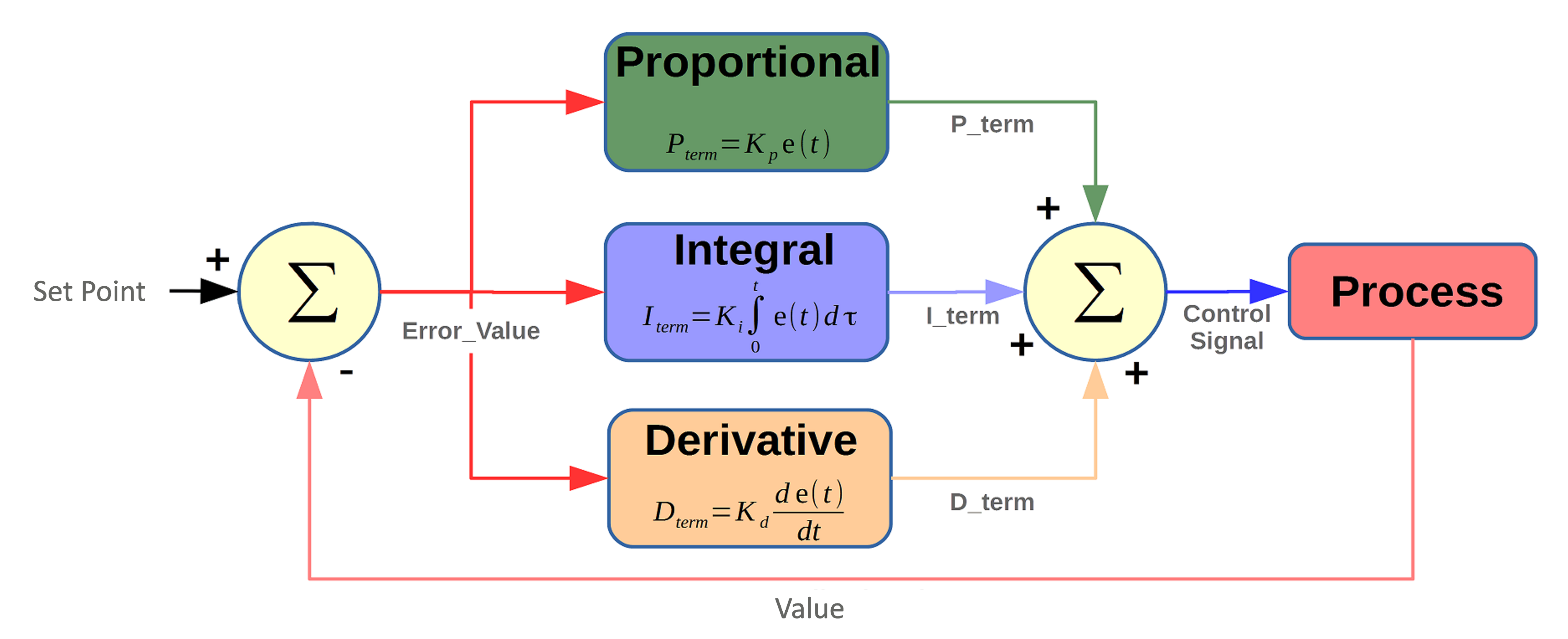
Example:
| |
bool = alarm( bool condition, ulong timeout_start, ulong timeout_end) | Implements an alarm with a start and end delay. If condition is true for more than timeout_start milliseconds, the alarm state is set. If condition stops being true for more than timeout_end milliseconds, the alarm state ends. The function always returns 0 or 1 depending on whether it's in an alarm state or not. | |
int = timer( TIMER_TON/TIMER_TOFF/TIMER_TP type, int in, ulong pt) | Implements an IEC 61131-3 style timer. The
The RTU-X has 16 simultaneous timers ( The elapsed time of each instance is exposed in the system variable Example:
| |
bool = interval( ulong value, ulong start, ulong end) | Checks whether value is within the interval between start and end.If start <= end, it simply checks that start <= value < end, and returns 1 if true or 0 if not.If start > end, it checks whether value >= start or value < end, and returns 1 if either condition is true, or 0 if not. | |
ulong = sunrise( ulong day, ulong month, ulong year, float latitude, float longitude) | Using an internal astronomical clock, returns the second of the day the sun will rise based on the date ( day, month, year) and position (latitude, longitude). Returns, as a ulong, the instant in seconds of the day in local time. The current second can be calculated as: current = hours * 3600 + minutes * 60 + seconds; Combined with the interval and sunset functions, you can easily determine whether it's day or night. | |
ulong = sunset( ulong day, ulong month, ulong year, float latitude, float longitude) | Using an internal astronomical clock, returns the second of the day the sun will set based on the date ( day, month, year) and position (latitude, longitude). Returns, as a ulong, the instant in seconds of the day in local time. The current second can be calculated as: current = hours * 3600 + minutes * 60 + seconds; Combined with the interval and sunrise functions, you can easily determine whether it's day or night. | |
pow(float x,float y) | Returns the result of raising x to the power of y. | |
log_e(float x) | Returns the base-e logarithm of x. | |
log_10(float x) | Returns the base-10 logarithm of x. | |
cos(float x) | Returns the cosine of x. With x in radians. | |
acos(float x) | Returns the arc-cosine of x in radians. | |
sin(float x) | Returns the sine of x. With x in radians. | |
asin(float x) | Returns the arcsine of x in radians. | |
tan(float x) | Returns the tangent of x. With x in radians. | |
atan(float x) | Returns the arctangent of x in radians. | |
sqrt(float x) | Returns the square root of x. | |
abs(float x) | Returns the absolute value of x. | |